Top 10 High-Protein Snacks Under 100 Calories for Smart Snacking
Daniela ManderinoSnacking gets a bad rap but when it’s done right, it’s one of the smartest ways to curb hunger, support steady energy, curb cravings, and hit your daily protein goals. The problem? Most snacks under 100 calories are just empty fillers: high in sugar, low in nutrients, and gone before your body even notices.
If you’re trying to fuel smarter whether it’s for fat loss, muscle repair, or appetite control your snacks need to pull their weight. That means protein. And not just any protein, but clean, plant-based sources that are easy on digestion and free from the usual junk.
This article breaks down the best low calorie high protein snacks that deliver real benefits. Every option is under 100 calories, rich in functional nutrition, and aligned with LyfeFuel’s clean-label standards so you can snack with purpose not just habit.
1. Roasted Edamame (½ Cup)
Crispy, salty, and surprisingly satisfying, roasted edamame is a go-to plant-based snack that delivers a serious protein punch for its size. Just half a cup offers around 9–10 grams of protein for 90–100 calories, depending on the seasoning and preparation.
Edamame is a complete protein meaning it contains all nine essential amino acids and it’s naturally rich in fiber and antioxidants like folate and vitamin K. The combination of protein and fiber helps keep you full longer, making it ideal for mid-afternoon slumps or post-workout refueling.
Look for dry roasted or lightly salted versions without added oils or preservatives. Or make your own at home with a pinch of sea salt and a quick roast in the oven.
2. Almond Butter on Celery (1 Tbsp + 2 Stalks)
This classic combo isn’t just about crunch, it’s a smart, balanced way to get in plant-based protein with under 100 calories. One tablespoon of almond butter paired with two celery stalks offers about 4 grams of protein and has 95–100 calories, depending on the brand.
Almond butter adds protein, healthy fats, and magnesium all of which help stabilize blood sugar and curb hunger. Celery adds volume without calories and brings natural electrolytes like potassium to the mix. Together, it’s a satisfying snack that feels bigger than it is.
Pro tip: Look for unsweetened almond butter with no added oils or sugars for the cleanest fuel.
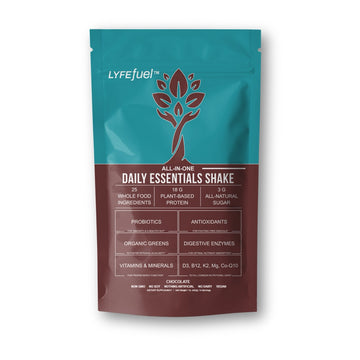
3. LyfeFuel Essentials Shake
Technically a little over the 100-calorie mark, LyfeFuel Essentials clocks in at 110 calories but it’s more than worth it. You’re not just getting a snack; you’re getting a complete nutritional boost.
Each scoop delivers 18 grams of complete plant protein along with 27+ essential micronutrients from organic sources like pea, rice, and pumpkin seed. It also includes digestive enzymes to support gut health and absorption, all without the gums, fillers, or artificial junk you find in typical shakes.
If you’re looking for something that keeps you full longer, supports metabolism, and does more than just fill a gap between meals, Essentials is one of the best low-calorie high-protein snacks you can add to your daily routine.
Before adding it to your routine, you can check the official LyfeFuel discount codes for offers.
Pro tip: Blend it with cold water or unsweetened almond milk for a creamy, gut-friendly shake that fuels your body and your goals.
4. Roasted Chickpeas (¼ Cup)
Roasted chickpeas are crunchy, savory, and surprisingly filling, all while delivering a solid 5–6 grams of protein in just a ¼ cup serving for around 90–100 calories.
Chickpeas are rich in plant-based protein and fiber, which means they digest slowly and help keep you full longer. They're also a great source of iron, magnesium, and folate nutrients that support energy metabolism and immune function.
Keep it clean: Opt for air-roasted or homemade versions seasoned with herbs, turmeric, or smoked paprika. Many store-bought options are fried or loaded with salt and oils, so check the label.
5. Pumpkin Seeds (1 Tablespoon)
Don’t let the small size fool you, pumpkin seeds, or pepitas, pack a serious nutritional punch. A 1-tablespoon serving contains around 90 calories and delivers 4–5 grams of protein, along with a healthy dose of magnesium, zinc, and iron.
Pumpkin seeds are a great plant-based protein with added anti-inflammatory and antioxidant benefits. They support immune function, muscle repair, and heart health, all while keeping you satisfied between meals.
Quick tip: Snack on them solo, sprinkle over a salad, or add to your homemade trail mix for a functional crunch.
6. Dry Roasted Peanuts (2 Tbsp)
This snack might be small in size, but it’s big on fuel. Just 2 tablespoons of dry roasted peanuts offer around 7 grams of protein for under 100 calories, making it one of the simplest ways to power up between meals.
Peanuts are technically legumes, not nuts, which means they naturally contain more protein than typical tree nuts. They’re also rich in magnesium and heart-healthy fats that help keep hunger in check. Just stick to unsalted, dry-roasted varieties to avoid added oils and sodium.
This one’s perfect for plant-based eaters who want a quick hit of protein without prepping or blending anything. Toss it into a snack box, keep it at your desk, or add it to a small salad for extra crunch.
7. Plain Greek Yogurt (½ Cup)
characters: 12465 ✨Sample HTML Docx Open Doc or HTML × Paste or compose your doc in the editor and switch to HTML view to get the code! Word Doc to HTML Online Converter WordHTML - Online Converter, Editor and Cleaner Free online Word to HTML converter with built-in code cleaning features. Open, edit and save Word documents online for free and download them in the desired format. It works perfectly for any document conversion, like Microsoft Word, Excel, PowerPoint, PDF, Google Docs, Sheets, and many more. You can also use this tool for composing web content from scratch or just to tidy up the dirty markup, switching easily between the real-time visual and source editors. Paste your doc in the editor and switch to the HTML tab to get the HTML code instantly. Discover more Business & Productivity Software Development Tools Document Formatting Guide Edit Word Documents Online You don't need a desktop program to edit Word documents anymore. Open one and make the necessary adjustments and download it How to Convert Doc to HTML? The process is very simple with this free online tool and it requires just a few simple steps: Open your file with Microsoft Word, WPS Writer or any other rich text editor. Or just drag-and-drop your .docx or .html file in the sidebar. Switch to the HTML tab and clean the code, make the necessary edits. Download the document in the desired format: Doc or HTML. Wordpress HTML Editor Word HTML is the perfect tool to edit the source code of WordPress articles or any other content management system when their built in composer doesn't provide all functionalities we need. Compose the content right in your browser window without installing any extension or plugin to handle the syntax highlighting and other text editing features. Discover more Word Processing Software Online Format Converter Online HTML Editor How To Use? Paste the document you want to convert in the Word Editor, then switch to HTML view using the big tabs at the top of the page to generate the code. Tip: You can drag and drop a .docx or .html file onto the “Open Doc or HTML” area (or click it to browse). To download your result, use the HTML button to save a .html file. If your HTML contains inline images, the HTML button will download a ZIP that includes index.html and an images/ folder. Use the Docx button to export a .docx file. When converting from DOCX, embedded images are inserted as Base64‑encoded data URLs in the HTML; during ZIP export, those images are extracted into separate files and referenced from the markup. Press the Clean button to execute the checked cleaning options in the list or do them one-by-one with the execute icons. styles remove style attributes from each tag:highlighted empty icon delete empty tags which don't contain anything:Hello World spaces clear successive non-breaking spaces and leave only one instance:attributes get rid of tag attributes (except href of links and src of images):
 class and id ico strip classes and IDs:
space ico wipe off elements that contain only a character:
class and id ico strip classes and IDs:
space ico wipe off elements that contain only a character:comments icon dislodge HTML comments: plain text icon convert the document to plain text:
text
Additional editor controls Discover more Web Design & Development Word HTML Code Cleaner source editor commands Undo, new page, indent markup, compress, activate character encoding. Our Sponsors🤝 "As Lead Dev of Spin the Wheel, the random wheel spinner tool, I often need to clean up text copied from documents. WordHTML.com makes it quick to tidy formatting and extract clean content." - Y. Deneha, Developer. EssayService is your go-to last-minute essay writing service online, delivering fast and top-quality papers when time is running out. WriteMyEssay is a reliable company that writes essays for students, offering expert academic assistance across all subjects and levels. Goread.io is the best website to buy Instagram likes. We suggest you familiarize yourself with an EssayPro essay writing service with native writers to improve your academic performance. Create HTML input fields, radio buttons, check boxes and more with the new online generator. Choose from our collection of free online Date Tools, calendars, converters, calculators, date pickers and more. Secure and quick to buy Instagram followers at Twicsy. Common Questions My document contains images. How can I extract them? You can do that easily with WordHTML. When you open a document that contains images, they are automatically converted and embedded into the HTML. Click the Download HTML button, and instead of a single HTML file, you will get a ZIP package containing an index.html file and all extracted images, properly referenced, ready to use. How to convert Word to HTML without dirty markup? MS Word allows to save the document as an .html file but this will result in a lot of unwanted dirty markup. This increases the file size and disrupts the website styles if you end up publishing it online. It's recommended to clean the HTML with this free online tool. dirty markup from MS Word Get rid of the mess generated by Word Editors How do I convert any visual text to HTML? Discover more Web Apps & Online Tools PDF Conversion Tools Software Utilities WordHTML editor works flawlessly for any visual document and allows them to convert with a couple clicks: Microsoft Office products (Word, Excel, Powerpoint) Google Docs, Google Sheets OpenOffice and other WYSIWYG editors ...any other visual text document (let us know if you find an exception) Copy-paste your document in the online editor then switch to HTML view in the header to get the result instantly. How to open a .doc file in the editor? First you need to open the document in a reader, select and paste the desired section in the web browser with WordHTML. How to save and publish the results? To publish your file on the web you need to paste the HTML code in a .html file and upload it to the web. If your site is using a CMS then you need to log in with editor credentials and publish the article in your admin area. How to clean the markup? Switch to HTML view to see the code, review the cleaning settings and press the big Clean button. Remove automatically inline styles, classes, empty tags, comments and other unwanted bits. html markup cleaning The markup can be cleaned with the click of a button Can I convert HTML code to Word document? Inverse conversion is also possible with WordHTML. Insert your code when the HTML tab is active and switch to Word Editor. Is WordHTML an online Word editor? Yes, and it's even more. It supports the most common WYSIWYG features but you can't save your document. To save you'll have to copy the results in a desktop editor and save there. This site uses cookies to collect visitor statistics and to save your settings. By using this website you accept our Terms&Conditions. ©WordHTML.com